How to Buy a Product or Meteor Pass
Learn about one-time purchases, Meteor Pass monthly/annual/lifetime plans, and post-payment delivery.
Two ways to buy: single product vs Meteor Pass
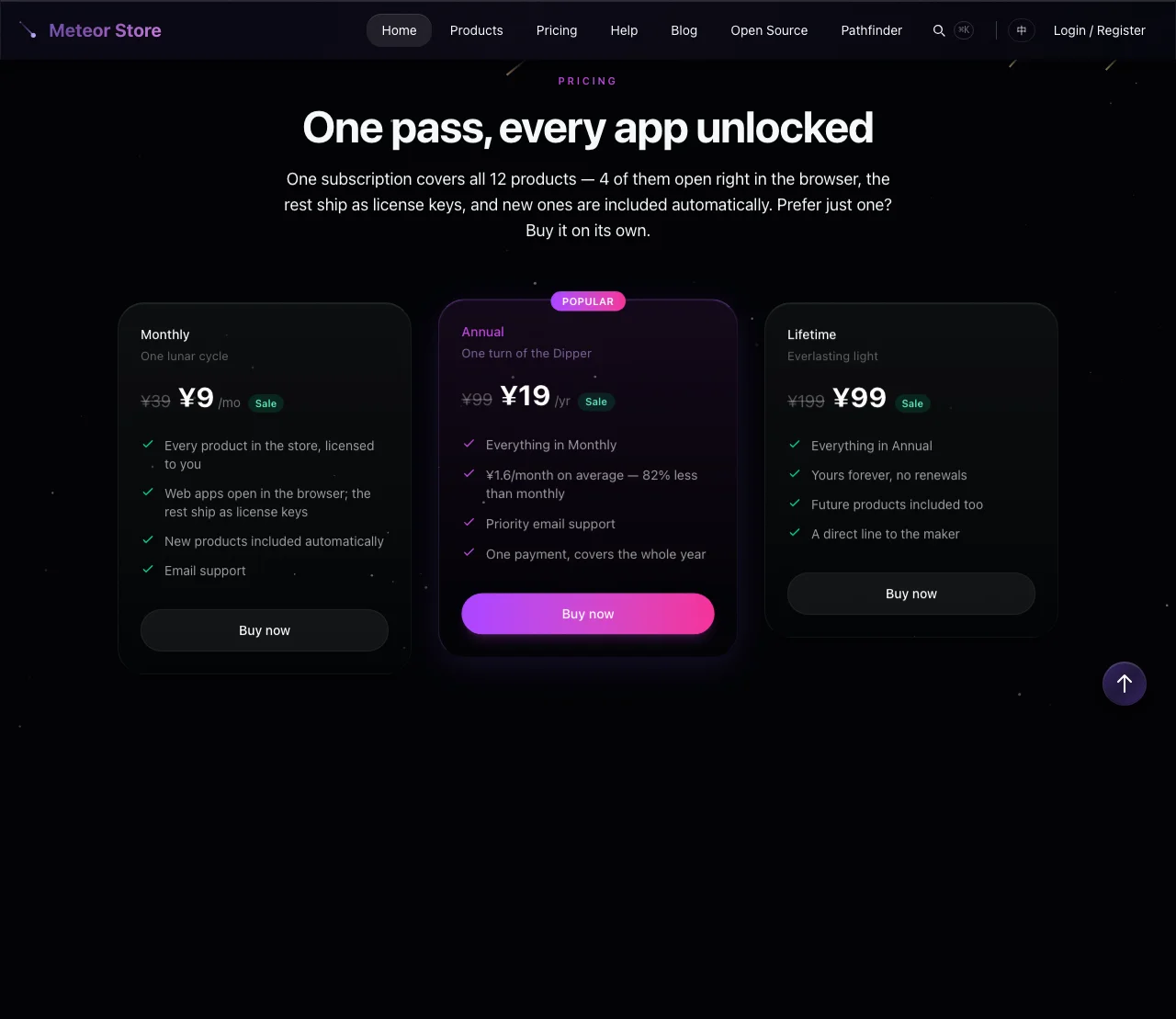 Meteor Store offers two purchase paths, each suited to different needs:
- Buy a single product — Choose a paid tier on a product's detail page and buy that one product. Once purchased, the product is yours permanently.
- Buy Meteor Pass — A site-wide membership. One payment unlocks every product in the store, including products added in the future. Pass subscriptions (monthly and annual) expire; the lifetime option is permanent.
If you only care about one product, buying it directly is simpler. If you want two or more products, Meteor Pass is usually the better deal.
Meteor Pass plans and pricing
Meteor Pass pricing is displayed in the #pricing section of the homepage and stays consistent across the help center. Three plans are currently available:
| Plan | Price | Duration | Notes |
|---|---|---|---|
| Monthly | ¥9 (was ¥39) | 1 month | Good for short-term use or trying it out |
| Annual | ¥19 (was ¥99) | 12 months | About ¥1.6/month on average; recommended |
| Lifetime | ¥99 (was ¥199) | Forever | Pay once, never renew |
The prices above are accurate as of this writing. The actual amount you pay is what appears on the checkout page. Meteor Pass covers all current and future products in the store — you won't pay extra when new products launch.
Buying a single product
- Find the product you want on the listing page or the homepage, then click through to its detail page.
- In the pricing section of the detail page, review the tiers and pick one that fits your needs.
- Click the purchase button for that tier. The system will guide you through the payment flow.
- After payment completes, the system automatically generates a license key (if the product requires one) and sends a confirmation email with order details to your registered email address.
- License keys are viewable in your Account page. For in-browser and downloadable apps, just go to My Products — no manual key entry needed.
A single-product license is permanent and never expires. Even if the product's price changes or it gets delisted later, existing purchasers are not affected.
Buying Meteor Pass
- Scroll to the pricing section (
#pricing) on the homepage, or click "Pricing" in the navigation bar to jump straight there. - Pick one of the three plans: Monthly, Annual, or Lifetime. The Annual plan is marked as "Recommended."
- Click the corresponding button to enter the payment flow. Note that Pass is a subscription (monthly/annual) or a one-time lifetime purchase — it is not priced per product.
- After payment completes, your account automatically gains access to every product in the store. On the My Products page, Pass-covered products show a "Pass" badge.
- If you chose Monthly or Annual, you will receive a renewal reminder before expiration. If you let it expire without renewing, Pass-covered products become inaccessible — but any single products you bought separately remain yours.
Refund policy
Meteor Store follows a unified refund policy. If you are not satisfied with a purchase, you may request a refund within a certain period after purchase. For the specific refund conditions, time window, and process, read the refund policy article in the help center or click the "Refund Policy" link in the footer.
After a successful refund, the corresponding license key is revoked and you will no longer be able to use that product. If the refund is for Meteor Pass, all Pass-covered product access is revoked simultaneously — but any single products you bought separately are unaffected.
Before you buy
- Confirm the product's delivery type first (in-browser app, downloadable app, or license key). Different types have different access flows. See the help article "What types of products are on the site, and how do they differ?" for details.
- Some products have a free trial embedded on the detail page. Try before you buy if available.
- If you have an invitation code, redeem it at the
/redeempage first. If the code covers the same product you were going to buy, you may not need to purchase separately. - All prices are in Chinese Yuan (CNY). Payment methods depend on what the checkout page supports at the time of purchase.
Related articles
How to Browse, Filter, and Compare Products
Browse products by category, view details and pricing, and find the right product for you.
How to Claim a Free Product
Find free or limited-time-free products, claim them, and access them anytime from My Products.
How to Redeem an Invitation Code
Find the redemption entry, enter your INV-XXXX invitation code, and receive your product license.
Still need help?
Send us the details of your issue, including the relevant environment and error message, and we'll look into it.
Submit a question